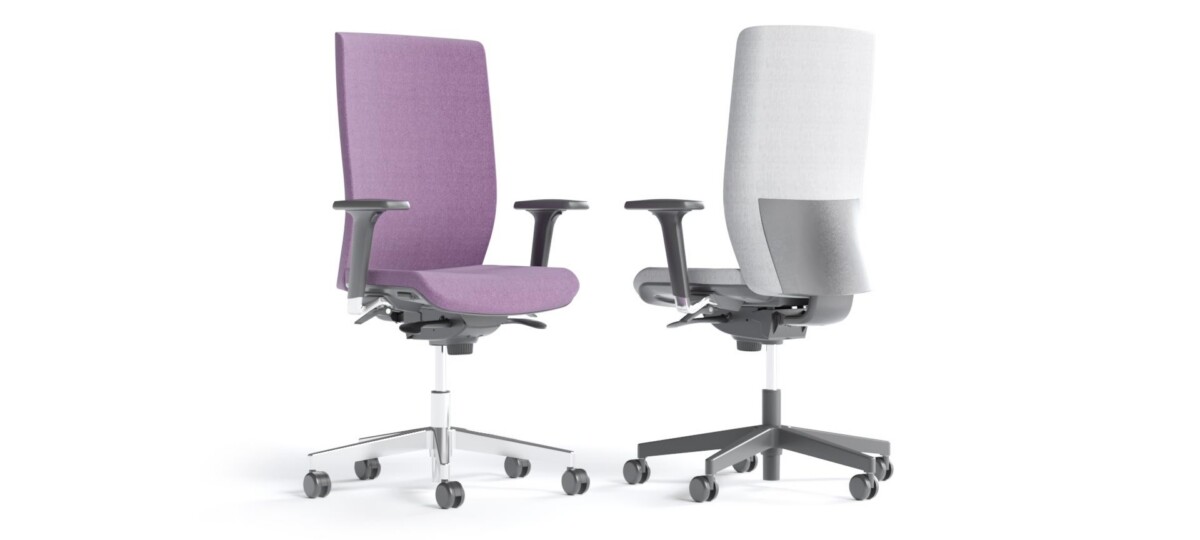
How to choose an Aura chair for your workspace
Start with the task and workstation. For a shared desk area, adjustable seat height can help users set the chair to suit their desk. If a chair needs to move between workstations, consider whether a swivel model fits the layout and how much room is available around the desk. The Aura family includes swivel task-chair configurations, so review each listing rather than assuming every model has identical features.
Next, decide whether armrests are useful. Armrest-equipped versions may suit workstations where users want that support, while armless models can be a practical choice when chairs need to tuck beneath desks or fit into a compact layout. Check the selected model’s dimensions and the clearance around the desk before ordering for a group.
Upholstery, base and configuration details
Upholstery options across the collection include fabric, Era, Berta, leather and PU leather. Color choices represented in the collection include neutral shades such as black, beige and grey, as well as blue, green, orange, pink, purple, red, brown and yellow. Not every material or color is available on every chair, so use the specific product details to confirm the combination you want.
Base materials listed for Aura include aluminium and metal, with black and silver finishes represented. The product range also includes configurations with different overall chair-height ranges. If matching chairs across a room, compare upholstery, base finish, armrests and listed height details together rather than choosing by appearance alone.
What to check before selecting a model
- Confirm whether the specific chair has armrests and adjustable seat depth; these features vary within the family.
- Check the listed upholstery and color for the exact model, particularly when coordinating several chairs.
- Compare the product dimensions with your desk and available floor space.
- Review the individual product information for warranty and other configuration details. A two-year warranty is listed in the collection attributes.
For an office fit-out, it can help to shortlist one or two Aura configurations and compare their features against the needs of each workstation. Myntwork offers Narbutas Aura chairs on a monthly lease, providing a way to consider the collection as part of a broader workplace furniture plan. Check the selected product details and your workspace requirements before finalizing a configuration.
Frequently asked questions about Narbutas AURA Office Chair
Do all Narbutas Aura chairs include armrests?
No. The collection includes both armrest-equipped and armless configurations. Check the details for each model to choose what suits the workstation.
Are seat height and seat depth adjustable on every Aura model?
Adjustable seat height is listed across the collection. Seat depth adjustment varies, so confirm this feature on the specific chair you are considering.
What upholstery can I choose for an Aura chair?
Collection-level options include fabric, Era, Berta, leather and PU leather. Materials and colors vary by model; check the product details for the available combination.
How do the Aura chair configurations differ in appearance?
Compare the listed upholstery and color, black or silver base finish, armrest option and overall chair-height details. These features are not identical across all models.
What should I check when choosing Aura chairs for a team?
Confirm the features, dimensions, upholstery and finish for each selected model. If you need consistent chairs, compare the exact configurations before choosing quantities.