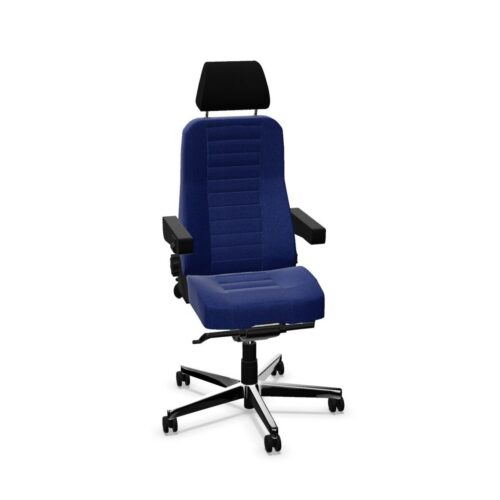
24/7 office chairs are intended for workplaces where seating may be used across extended shifts, shared between several people or occupied for much of the day and night. They are commonly considered for control rooms, monitoring suites, security desks, emergency-service support areas and other operational settings with continuous or near-continuous staffing.
In a leased workplace-furniture scheme, this chair type can help procurement teams identify seating suited to demanding patterns of use. The products shown in this selection are categorised as 24/7 chairs; individual specifications, adjustments, materials and suitability should always be checked on the relevant product page.
What is a 24/7 chair?
A 24/7 chair is an office-chair typology associated with intensive, multi-user operation. Unlike a chair selected solely for an occasional desk or meeting position, it is generally specified with workplaces in mind where users change over frequently and the chair has little downtime between shifts.
The term describes a typical application rather than one fixed design. A 24/7 chair may be a task chair with a high or medium back, a headrest, adjustable arms, a supportive seat and a range of ergonomic controls. The exact configuration varies by model. It should not be assumed that every chair in this archive includes the same mechanism, back height or accessory.
Why intensive-use seating needs careful specification
Continuous workstations place different demands on furniture planning. A chair may need to accommodate a varied user group, support people through long periods of focused screen work and remain appropriate in a space that cannot easily be taken out of service. Selecting the right model is therefore about more than its appearance or whether it fits beneath a desk.
- Shared use: straightforward, accessible adjustments can make changeovers easier for different users.
- Working posture: seat, back and arm support should be considered alongside monitor, desk and keyboard positions.
- Operational consistency: choosing a suitable chair type across comparable stations can simplify planning and replacement decisions.
- Environment: upholstery, finish and cleaning requirements may be important in high-traffic or controlled areas.
- Space planning: the chair’s footprint, movement around consoles and clearance under work surfaces all affect usability.
For procurement teams, it is useful to assess the chair as part of the full workstation. Desk height, screen layouts, equipment reach, floor surface and the number of people using each position can all influence the final choice.
Typical workplaces for 24/7 office chairs
This category is particularly relevant where an organisation operates shifts or maintains staffed functions beyond standard office hours. Control and response environments are obvious examples, but intensive-use seating can also be appropriate in corporate and public-sector operations teams where a desk is routinely shared.
Common settings include:
- security and reception control points with extended coverage;
- facilities-management, building-management and monitoring rooms;
- transport, logistics and dispatch operations;
- customer-support and service desks operating across long hours;
- emergency-planning, incident-response and coordination spaces;
- technical support centres and network operations rooms.
Requirements differ between these environments. A compact position at a multi-screen console may call for different dimensions and controls from a chair at a reception desk or dispatch workstation. Reviewing the way each station is used helps avoid treating all shift-based roles as identical.
Features to review on individual chair models
Because 24/7 is a classification rather than a single product specification, compare each product’s listed details before including it in a furniture schedule. The most useful features are those that help the intended users set up the chair for their task and work surface.
Adjustability and support
Look at the available seat-height adjustment, back support, recline or tilt controls, seat-depth adjustment and arm options where these are stated. For shared chairs, consider whether users can understand and access the controls without disrupting the next shift. A headrest may be relevant for some roles and users, but is not necessary for every operational workstation.
Size, finish and practical details
Check overall dimensions, back height, upholstery or surface type, base style and castors against the proposed floor and workstation. In areas where cleaning is frequent, the stated care guidance and material choice may form part of the specification. Colour and finish can also be coordinated with the wider office or operations-room scheme without taking priority over fit and function.
How to choose a chair for a shared shift workstation
Start with the people, tasks and duration of use rather than selecting by chair type alone. Observe the workstation where possible: the position of screens, radios, telephones and documents can reveal whether users need to lean forward, turn regularly or move between seated and standing tasks. This information gives facilities and procurement teams a clearer basis for comparison.
- Identify how many users share the chair and the pattern of shift changes.
- Measure desk, console and under-desk clearances, including routes around the workstation.
- List the adjustments that users are likely to need for the work being carried out.
- Compare the stated product dimensions, features and materials for suitable models.
- Consider how the chair will sit alongside existing desks, screens and other furniture.
Where a project includes a mixture of continuously staffed positions and conventional desks, separating the requirements can be sensible. A standard task-chair requirement may suit some areas, while designated 24/7 positions can be specified for the workstations with the most demanding usage pattern.
Questions to consider before adding 24/7 chairs to a scheme
- Is the chair for one regular user, or several people over consecutive shifts?
- How long is the workstation normally occupied in a 24-hour period?
- Which adjustments are needed for the user group and the work surface?
- Are there constraints from console design, cable management, screens or nearby storage?
- What upholstery, finish and cleaning approach is appropriate for the location?
- Will the chairs form part of a wider ergonomic workstation review?
These questions help create a more consistent brief for comparable roles. They also make it easier to evaluate product information without assuming that one 24/7 chair will automatically suit every setting.
Planning office-chair leasing with Myntwork
Office-chair leasing can be considered alongside the rest of a workplace furniture plan, whether the requirement is for a small number of operational seats or a broader refit across desks, meeting areas and support spaces. Product-level information remains important: confirm the details of each selected model against the needs of the site and the people who will use it.
Browse the wider range of office chairs for task, executive and other workplace seating types. For a broader overview of posture, adjustments and workstation considerations, see Myntwork’s guide on how to choose an office chair.