

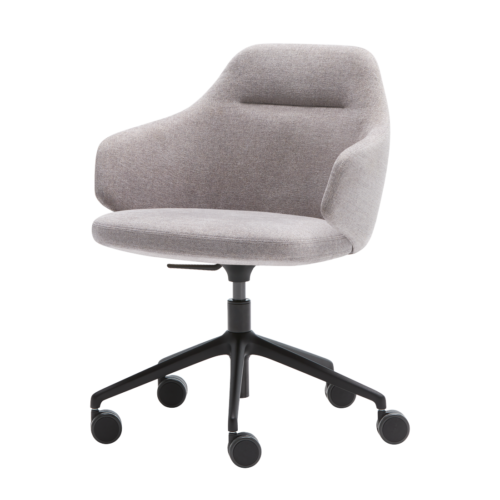
Office Chairs With Fixed Arms Without Lumbar Support

A useful assessment begins with the features that cannot be changed or called upon. Office chairs with fixed arms without lumbar support have armrests in a fixed position and no lumbar support feature. That combination makes the existing armrest geometry and the user’s experience of the backrest central to the comparison. Neither characteristic establishes overall suitability on its own, and neither supplies information about other dimensions or settings.

For workplace planning, start by identifying who will use the seating and at which desks. A fixed armrest position needs to fit the intended person and surrounding furniture, while backrest contact should be assessed without expecting lumbar adjustment to address a mismatch. Try ordinary activities rather than a single seated pose. Approaching the keyboard, turning towards a colleague and getting up can reveal different requirements. Keep those observations specific, so the eventual decision rests on practical evidence about the chair and its intended setting.

6 models
From €10.17 p/m
Price on request
2 models
From €35.28 p/m
4 models
From €28.11 p/m
6 models
From €23.37 p/m
3 models
From €23.12 p/m
5 models
From €17.49 p/m
10 models
From €10.37 p/m
3 models
From €1.78 p/m
3 models
Price on request
7 models
From €13.90 p/m
€9.00 p/m
2 models
From €20.66 p/m
2 models
From €45.80 p/m
3 models
From €22.88 p/m
18 models
From €15.83 p/m
17 models
From €4.61 p/m
2 models
From €17.67 p/m

Define the Intended Seating Assignment

Office chairs with fixed arms without lumbar support warrant a clear distinction between individual and shared use. For an assigned chair, assess the named person's usual workstation and tasks. For a shared arrangement, include representative users because the fixed arms remain in the same position for everyone. Do not assume that one person's preferred arm placement describes the needs of the group. Record the desks involved as well as the people. A chair that fits one arrangement may encounter different clearances elsewhere, and those differences need checking before conclusions are extended across a department or room.

Test Fixed Arm Geometry at the Desk

Begin with natural arm placement, then examine how the fixed rests relate to the worktop. Ask the person to reach the keyboard and pointing device without deliberately shifting into a demonstration pose. Note any contact between the arms and desk, and whether the chair stops farther away than the person would choose. Also test leaving the desk and approaching it again. The purpose is to understand the existing dimensions in use. Other adjustments, if present, should be checked individually rather than treated as a guaranteed remedy for an unsuitable armrest position or spacing.

Assess Backrest Fit Without Lumbar Support

When examining office chairs with fixed arms without lumbar support, focus on the back contact users actually experience. Ask where the backrest meets them, whether that contact remains useful during familiar tasks and what changes as they move. The absence of lumbar support does not describe the complete backrest shape or its available settings. Verify those details separately. Avoid adding an accessory during the initial comparison, because that would change the arrangement being assessed. First establish how the chair itself fits, then record any further requirement clearly as a separate workplace consideration for the manager.

Make Comparison Notes Easy to Interpret

A structured record should connect each observation to a person, desk and activity. Replace broad comments with descriptions such as restricted desk approach, unwanted arm spacing or limited backrest contact during document work. Office chairs should be compared under similar conditions so that furniture differences do not obscure the seating assessment. Include positive observations with the same specificity. Check any unconfirmed dimensions or controls before discussing the outcome with colleagues. This produces a practical account of the combination and helps distinguish a consistent limitation from a concern associated with one particular workstation or task.

Questions for Fixed-Arm Seating Assessments

Can fixed armrests be adjusted for different users?

Fixed armrests do not provide the repositioning associated with adjustable arms. Assess their existing height, spacing and relationship with the desk for each intended user. Do not describe other chair settings as a substitute without testing how those changes affect the person's complete working position and backrest contact.

What should we check without lumbar support?

Examine the actual backrest contact, the user's usual posture and the demands of their tasks. Confirm any backrest settings separately. The absence of lumbar support identifies one missing feature, but it does not answer every question about the backrest or establish whether an individual will find the chair suitable.

Is a group trial useful for this selection?

Yes, particularly for shared workstations. Compare office chairs with fixed arms without lumbar support with people who represent the intended users. Record their experiences independently before discussing the results. Look for recurring requirements and individual mismatches, rather than assuming that a majority preference resolves every person's seating needs.

Explore related selections